Pet Vs Human Threat Detection
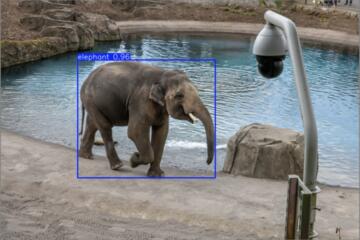
AI threat detection for cameras and sensors often includes a classification step that labels detected objects as “person,” “animal,” or “unknown.” That label then drives the alert type, such as “human detected” versus “motion detected.” In practice, the system may also estimate bounding boxes, track movement across frames, and apply confidence thresholds before it notifies you.
Pet-vs-human differentiation matters because the downstream behavior changes with the label. A “person” alert might trigger a siren, a call to a monitoring service, or a faster escalation path, while an “animal” alert might only log an event. If a cat or dog triggers the “person” path, you get nuisance alerts and potentially risky responses. If a person is misclassified as an animal, you lose coverage when you need it most.
Common real-world examples include outdoor cameras that see a dog running along a fence line, indoor cameras that watch a doorway where a pet jumps up, and workplace sensors that monitor restricted areas where animals occasionally enter. In each case, the system’s ability to separate fur, motion patterns, and body proportions from human features determines the alert quality.
Main Problems And Pain Points
People often assume the camera “understands intent,” but most systems start with visual cues and motion patterns rather than intent. A dog’s size, posture, and movement can resemble a person in silhouette, especially when the animal is upright, partially occluded, or close to the camera. A human can also look like an animal when the person is far away, wearing bulky clothing, or moving quickly in low light.
Classification depends on supporting technologies that readers rarely see. Many systems use a combination of object detection models, tracking logic, and post-processing rules such as region-of-interest masks and confidence thresholds. Lighting conditions strongly affect feature extraction; infrared night vision can flatten textures and increase confusion between fur and clothing. Lens angle and camera height also matter, because perspective changes apparent proportions.
Another pain point is the “alert policy” layer, which can override the model’s raw output. Some products treat any high-confidence “person” detection as an alert, while others require persistence across multiple frames. If the policy is tuned for fast detection, it may accept borderline classifications and raise false alarms. If the policy is tuned for low false alarms, it may delay alerts enough that you miss the moment you care about.
Finally, training data and labeling coverage influence outcomes. A model may perform well on common dog breeds and typical indoor lighting, yet struggle with unusual fur colors, hair length, or motion blur. Even when the model is accurate on average, edge cases cluster around specific setups: a pet near a bright window, a person behind a curtain, or a camera mounted at a steep downward angle. I have seen configuration guides mention “pet detection,” but the underlying behavior often depends on how the system defines “pet” for that specific deployment, which, frankly, most people skip.
Solutions And Advice
Start With Sensor And Lighting
Begin by matching the sensor to the environment. Outdoor cameras typically rely on visible-light imaging during the day and infrared at night; infrared can reduce detail and increase confusion. If your setup uses IR night vision, test at night with your pet at typical distances and postures, then adjust sensitivity or detection zones based on what you actually see. A practical aside: on one common consumer app version (for example, v3.2.x of a camera companion app), the “person/animal” toggle may exist, but the default motion sensitivity can still dominate the alert logic.
Use camera placement to reduce ambiguous views. Aim to avoid direct glare from headlights, reflective floors, or bright windows behind the subject. If the camera looks down a hallway, keep the doorway fully in frame so the model sees consistent body proportions rather than partial silhouettes. For indoor setups, reduce clutter near the camera; moving objects like curtains and ceiling fans can create motion cues that tracking logic misattributes to a person-shaped target.
Tune Zones, Thresholds, And Persistence
Most systems expose controls such as detection zones, sensitivity, and sometimes a “person/animal” filter. Use zones to exclude areas where pets move but humans rarely appear, like the yard edge behind a fence or the corner where a dog sleeps. Then tune sensitivity so that small movements do not trigger alerts. If the system offers a persistence setting (for example, “detect after 1–2 seconds”), increase it slightly to reduce single-frame misclassifications, though this can delay alerts.
Confidence thresholds matter because they trade false positives for false negatives. A higher threshold reduces nuisance alerts but can miss low-confidence detections, such as a person far from the camera. A lower threshold catches more events but increases pet-to-human confusion. Record your results for a week, because one day of testing rarely captures weather changes, shadows, and different pet routines.
Use Alert Workflows That De-Risk Actions
Even with good classification, treat “person detected” as a signal, not a guaranteed fact. Configure workflows so that alerts escalate only after additional checks. For example, require a second event type (like “human detected” plus “entry into restricted zone”) or a short confirmation window before triggering loud alarms. If the system supports it, enable “human verification” through a secondary sensor such as a door contact or a separate PIR motion detector.
When monitoring services are involved, clarify how they interpret labels. Some monitoring centers may treat “person detected” as a higher priority than “animal detected,” which can raise response costs and stress. A cautious approach is to set the first alert level to “notify” and reserve “dispatch” for confirmed events, especially in homes with frequent pet movement.
Validate With Repeatable Tests
Validation should be repeatable, not based on a single incident. Test at the same times of day you expect alerts: morning glare, evening shadows, and night IR conditions. Try multiple distances and postures: a pet standing upright, a pet walking low to the ground, and a human approaching at normal pace. Note the system’s confidence readout if available; if the app shows a confidence percentage, log it alongside the outcome.
Use a simple scoring method: count false “person” alerts triggered by pets, and count missed “person” events when a human walks through the same path. Even rough counts help you decide whether to raise thresholds, adjust zones, or change camera placement. If you see consistent errors at one distance band, that often points to perspective or resolution limits rather than a model “learning” problem.
Case Examples
Outdoor Camera Near Fence Line
A homeowner installs a camera covering a side yard. The dog runs along the fence, and the system logs several “person detected” alerts at dusk. The camera sits low, and the dog’s body aligns with the fence posts, creating vertical edges that resemble a human silhouette. After adjusting the detection zone to exclude the fence-post strip and increasing the persistence time by a small amount, the false alerts drop, while human detections remain reliable when a person walks through the main yard path.
The lesson is mechanical: the model’s classification is sensitive to geometry and occlusion. The fix targets the geometry by changing what the model sees, not by assuming the model “should know” the dog is a pet.
Indoor Doorway With Jumping Pet
An apartment resident places an indoor camera facing a doorway. The cat jumps onto a chair near the lens and occasionally triggers “person detected” alerts. The cat’s upright posture and proximity to the camera create a body outline that overlaps with the human bounding box area. The resident reduces motion sensitivity, adds a zone that excludes the chair area, and changes the alert workflow so that “person detected” triggers a notification but not an alarm until a second confirmation event occurs.
The outcome is fewer nuisance alerts and fewer disruptive escalations. The system still records animal events, which helps the resident review patterns rather than reacting to every label.
Comparison Table For Decision Support
| Approach | What It Tries To Do | Typical Failure Mode | Best Use Case |
|---|---|---|---|
| Single-Label Alerts | Alert on the model’s “person” label | Pets upright near the lens or occluded silhouettes | Low pet traffic and low tolerance for missed events |
| Zone-Restricted Alerts | Alert only inside selected regions | Humans entering from excluded areas | Clear paths where humans pass and pets stay elsewhere |
| Persistence/Frame Voting | Require detection across multiple frames | Delayed alerts during fast motion or low light | Reducing one-off misclassifications |
| Multi-Sensor Confirmation | Combine camera labels with PIR/contacts | Sensor mismatch and configuration drift | Workflows where false alarms are costly |
Common Mistakes
One frequent mistake is tuning sensitivity without changing zones. If the camera still sees the same ambiguous area, lowering sensitivity can reduce alerts but also hide real human events. Another mistake is assuming “pet detection” automatically learns your specific pet. Many systems do not offer true per-animal training; they rely on general model categories and your configuration choices.
People also misread the meaning of “confidence.” A high confidence score can still be wrong when the scene geometry matches a known failure pattern, such as a pet near a vertical fence edge. Conversely, a lower score can still correspond to a real person when the person is far away or partially occluded. Treat confidence as a hint, then validate with repeatable tests.
A practical frustration: some apps show a “person detected” notification but the underlying event log may include multiple intermediate detections. If you only look at the final alert, you miss whether the system briefly labeled “animal” and then switched to “person.” Reviewing the event timeline helps you decide whether to adjust persistence, not just sensitivity.
Finally, avoid using the camera label as the sole trigger for actions that affect safety. If a system triggers a loud alarm based only on a single “person” label, pets can cause unnecessary escalation. A safer design uses confirmation steps and human review for ambiguous cases.
FAQ
Why do pets trigger “person” alerts?
Pets can match human-like silhouettes when they stand upright, move close to the camera, or appear partially occluded. Low light and infrared night vision can also reduce texture cues that separate fur from clothing.
Do pet detection settings train the model on my animal?
Many consumer systems use general “person” and “animal” categories rather than per-pet training. Some offer limited customization, but the exact behavior depends on the product and firmware, so you should test with your pet after any setting change.
What settings reduce false alarms without missing people?
Use detection zones to exclude pet-heavy areas, raise persistence so single-frame errors do not alert, and keep sensitivity moderate. Then validate with repeatable tests at day and night conditions.
How does night vision affect pet vs human classification?
Infrared imaging often flattens detail and changes contrast, which can make fur patterns less distinguishable from clothing. This can increase confusion at certain distances, especially when the subject is near reflective surfaces.
Should I rely on “person detected” for safety actions?
Use “person detected” as a signal that triggers review or secondary checks. For safety-critical actions, add confirmation steps such as zone entry plus another sensor event, or require a short confirmation window.
Author's Insight
Pet-vs-human threat detection is mostly a problem of perception under constraints: lighting, camera geometry, occlusion, and the alert policy that converts model outputs into actions. The most reliable improvements usually come from changing what the camera sees (placement and zones) and how long the system waits before alerting (persistence), not from expecting the classifier to “understand” pets. When you evaluate a setup, count false alerts and missed detections over multiple days rather than reacting to one incident. If you want to reduce nuisance alerts without losing coverage, design the workflow so that a single label cannot directly trigger the most disruptive response.
Key Takeaways
- Pet-vs-human errors often come from silhouette similarity, occlusion, and night lighting rather than intent misreading.
- Zones and persistence settings usually reduce false “person” alerts more reliably than sensitivity tweaks alone.
- Validate with repeatable tests across distances, postures, and day/night conditions, then adjust based on counts.
- Use confirmation steps for safety-critical actions so a single classification label does not drive escalation.