VR Training For Service Staff
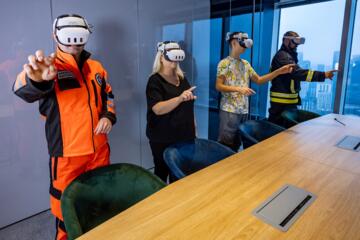
Virtual Reality (VR) training places staff inside a simulated environment where they practice service tasks through guided scenarios. A typical module might recreate a reception desk, a workshop counter, or a customer waiting area, then prompt the trainee to perform steps such as greeting, collecting details, handling a complaint, or following a safety procedure. The simulation records actions like button selections, spoken responses if the system supports speech, and time spent on each step, then compares results against a rubric.
VR works best when the service work has repeatable sequences and clear “what good looks like.” For example, a staff member can practice a standardized intake script, learn where to stand during a handoff, and rehearse how to respond when a customer reports a missing item. In a service setting, the goal usually involves fewer procedural errors and more consistent communication, not perfect realism.
Hardware choices matter because they shape what trainees can do. A room-scale headset with hand tracking supports physical gestures and object interactions, while a seated headset with controllers may focus on menu choices and scripted movements. I’ve seen teams lose weeks because they bought headsets first and only later discovered their content pipeline required a specific controller mapping or a particular Unity build (for example, Unity 2021 LTS vs 2022 LTS).
Main Pain Points And Misreads
People often treat VR as a “watch and learn” substitute, then measure success using satisfaction surveys. That approach misses the mechanism: VR training changes behavior only when the scenario forces decisions and feedback. If the module lets trainees click through without consequences, the system records activity but not competence.
Another common misread involves dependencies. VR training depends on content design, scenario scripting, device calibration, and a scoring method that matches the service task. If the scoring rubric rewards speed over accuracy, trainees learn to rush. If the module uses generic customer dialogue that doesn’t match your real policies, staff may rehearse the wrong steps.
Motion sickness and attention drift also distort outcomes. Many VR systems use a fixed frame rate and head-tracked rendering; when performance drops or locomotion is artificial, some trainees feel discomfort and disengage. That doesn’t just affect comfort; it changes how people interact with the scenario and can bias results toward those who tolerate VR well.
Finally, VR training can fail when it ignores the “last mile” between simulation and the actual workplace. A trainee may master a virtual script but still forget to follow the real checklist under time pressure. Without a transfer plan—like a post-session checklist, supervisor observation, or a short on-the-job refresher—VR becomes an isolated learning event.
Solutions And Advice For Setup
Define Measurable Competencies
Start by writing a competency list that can be scored inside VR. Break each service task into observable steps: greeting within a time window, collecting required fields, offering the correct next action, and escalating when conditions trigger. Then map each step to a VR event, such as selecting the right form field, choosing the correct response option, or completing a safety sequence in the right order.
Use a rubric with at least two dimensions: accuracy (did they do the right steps) and process quality (did they follow the expected order, ask required questions, and avoid prohibited actions). For realistic targets, many training programs aim for measurable improvement over a pilot cohort, such as reducing critical errors by 20–40% after a few sessions, while time-to-completion may improve more slowly and varies by task complexity.
Keep the scoring aligned with real policies and local procedures, not with what seems intuitive in a virtual scene. When teams skip this mapping, they end up with “training completion” metrics that do not predict on-the-job performance.
Choose Hardware And Content Fit
Select headsets and input methods based on the service actions you need to practice. If staff must handle virtual objects—like scanning a label, placing items into a bin, or confirming a part number—hand tracking or controller-based interactions can work. If the task is mainly conversational and procedural, controller-based selection menus may be enough and reduce motion discomfort.
Plan for calibration and device management. A practical setup includes a consistent fit check, IPD (interpupillary distance) adjustment where supported, and a repeatable way to reset the trainee to the same starting state. I’ve also seen teams underestimate the time needed for headset cleaning and charging rotation; a busy training day can stall if devices are not ready for the next group.
Content format matters too. Many VR training systems rely on engines like Unity or Unreal, and the content may require specific SDK versions. If your vendor delivers content as a compiled package, ask what runtime it targets and how updates are handled, because mismatches can break controller bindings or UI scaling.
Run Pilots With Transfer Checks
Use a pilot cohort before scaling. A pilot should include baseline performance, VR training sessions, and a follow-up observation on the job. Baseline can be a short assessment using real checklists or recorded role-play. Follow-up can be supervisor scoring during live shifts, ideally within one to two weeks so the learning transfer window stays tight.
Track both leading and lagging indicators. Leading indicators include scenario completion accuracy, number of critical mistakes, and time spent on each step. Lagging indicators include reduced rework, fewer customer escalations tied to procedural errors, and improved adherence to safety steps.
Expect variability. Some trainees improve quickly because they already follow the script; others need repeated exposure to build muscle memory for the sequence. If the pilot shows no change, the issue often sits in scenario design or scoring, not in the headset.
Design Feedback That Teaches
VR feedback must connect to the real-world rule. After an incorrect action, the system should show the specific policy step that was missed and why it matters operationally, not just that the answer was wrong. For example, if the trainee selects the wrong escalation path, the feedback can reference the condition that triggers escalation and the correct contact workflow.
Use feedback timing carefully. Immediate feedback helps for discrete steps, while delayed feedback can work for longer role-play sequences where the trainee needs to finish the interaction before reviewing. A common pattern is “micro-feedback” after each critical step and a short debrief at the end with a summary of errors.
Debrief should include a human component. A supervisor can translate the VR rubric into workplace language, which reduces the chance that trainees treat the simulation as a separate game.
Case Examples From Training Programs
Front Desk Intake Scenario
A mid-size service center trained new front-desk staff using a VR module that simulated customer intake. The scenario required staff to collect required fields, confirm appointment details, and route the request to the correct workflow. The VR system scored accuracy on mandatory fields and flagged critical errors such as missing a required identifier or selecting the wrong routing category.
In the pilot, trainees completed three VR sessions over two weeks. Supervisor observation during live shifts showed fewer “missing field” incidents, while average handling time improved modestly. The team also noticed that trainees who skipped the debrief repeated the same routing mistake, which led to a rule: no trainee leaves VR without a short supervisor review of their top two errors.
Safety And Equipment Handling
A training team used VR for a safety workflow involving equipment handling and workspace checks. The module required trainees to perform a sequence: verify the workspace state, confirm equipment readiness, and follow a safe handoff procedure. The VR system used controller-based interactions to simulate turning on equipment states and selecting the correct safety steps.
After a pilot, the team saw fewer critical safety deviations during audits, but only after they adjusted the scenario to include realistic “interruptions,” such as a simulated customer question mid-sequence. Without that interruption, trainees performed well in VR yet reverted to skipping steps when real distractions occurred.
That outcome matched a common training principle: the simulation must include the same constraints that cause errors in the workplace, even if the visuals remain simplified.
VR Decision Checklist
| Decision Area | What To Check | Why It Matters | Pass/Fail Signal |
|---|---|---|---|
| Competency Scoring | Can the system score accuracy and critical errors per step? | VR must measure decisions, not just exposure. | Rubric maps to your real checklist with testable events. |
| Content Realism | Does it include workplace constraints like interruptions and escalation rules? | Transfer fails when VR removes the stressors that trigger mistakes. | Pilot shows fewer real-world critical deviations. |
| Device Fit And Comfort | Is there a plan for IPD/fit, cleaning, and motion discomfort? | Discomfort changes behavior and can bias results. | Defined comfort protocol and observed completion rates. |
| Data Handling | What data is stored, where, and who can access it? | Training logs can include personal performance data. | Documented retention, access controls, and consent basis. |
| Transfer Plan | Is there supervisor follow-up and a live checklist? | VR alone rarely changes behavior under real pressure. | Follow-up audit within 1–2 weeks shows improvement. |
Common Mistakes That Undermine Trust
A frequent mistake is treating VR as a one-time training event. Service work often requires repeated practice and reinforcement, especially for rare but high-risk situations like escalation or safety deviations. Without follow-up, trainees revert to habitual shortcuts.
Another issue is confusing “time in VR” with learning. If the module allows repeated retries without changing difficulty or feedback, trainees can accumulate exposure while still missing the critical steps. Scoring should highlight the same errors that matter in the workplace, and the debrief should address them in plain language.
Teams also overestimate the value of generic analytics dashboards. Many dashboards show completion rates and average scores, but they rarely reveal which step causes failures. A useful dataset breaks down errors by step, by scenario variant, and by trainee group so you can adjust the content.
Finally, privacy and data governance get skipped. VR training can generate performance logs tied to individuals, and some systems may capture voice or biometric-adjacent signals depending on configuration. If you cannot answer where the data goes, how long it stays, and who can access it, the training program becomes hard to defend internally.
FAQ
What service tasks fit VR best?
VR fits tasks with repeatable sequences and observable decisions, such as intake workflows, scripted communication steps, safety checklists, and escalation routing. It fits less well when outcomes depend mainly on long-term judgment without clear step-level criteria.
How many VR sessions are typical?
Many programs start with 2–4 sessions for a new module, spaced over days, then add supervisor follow-up on live shifts. The exact number depends on how many critical steps exist and how quickly trainees make the same errors.
Do VR headsets record trainee behavior?
Most VR training systems record interaction events needed for scoring, such as selections, timing, and scenario progress. Some systems may also record voice or other signals if configured; the vendor should document what is collected and retained.
How do you reduce motion sickness during training?
Use comfortable locomotion modes, keep frame rates stable, limit session length, and offer breaks for trainees who feel discomfort. A practical policy includes a stop-and-rest option and a way to switch to a non-VR refresher when needed.
How do you measure training transfer to the job?
Compare baseline and follow-up performance using real checklists, supervisor audits, or quality metrics tied to procedural errors. A follow-up window of one to two weeks often shows whether the simulation supports behavior under normal workplace pressure.
Author's Insight
VR training succeeds when it turns service procedures into scored decisions, then connects those decisions to real workplace rules through debrief and observation. The strongest evidence in practice comes from pilots that track step-level critical errors and then verify changes during live shifts, not from completion metrics alone.
Content quality often determines outcomes more than headset brand. If the scenario lacks the same constraints that trigger mistakes—interruptions, escalation conditions, or time pressure—trainees can perform well in VR and still fail in the field.
Data handling deserves the same attention as the training design. Performance logs can be personal, so retention periods, access controls, and consent basis should be documented before rollout.
Key Takeaways
- Score competencies inside VR using step-level rubrics tied to your real checklists, not just completion time.
- Match hardware and interaction style to the service actions you need to practice, then plan for comfort and device management.
- Run a pilot with baseline and follow-up audits within 1–2 weeks to test learning transfer.
- Use debriefs and supervisor observation so VR performance maps to workplace behavior under interruptions.
- Document what training data is collected, where it is stored, and how long it is retained to avoid governance gaps.